Hello. @JuninhoResende
To send email notifications to Webmail support, follow the steps below:
Access Notification Settings:
- Browse the Settings menu and select System.
Configure Email Notifications:
- In the Notifications menu, choose Notifications via Email.
- Check Enabled to enable email notifications.
- Email Server Details:
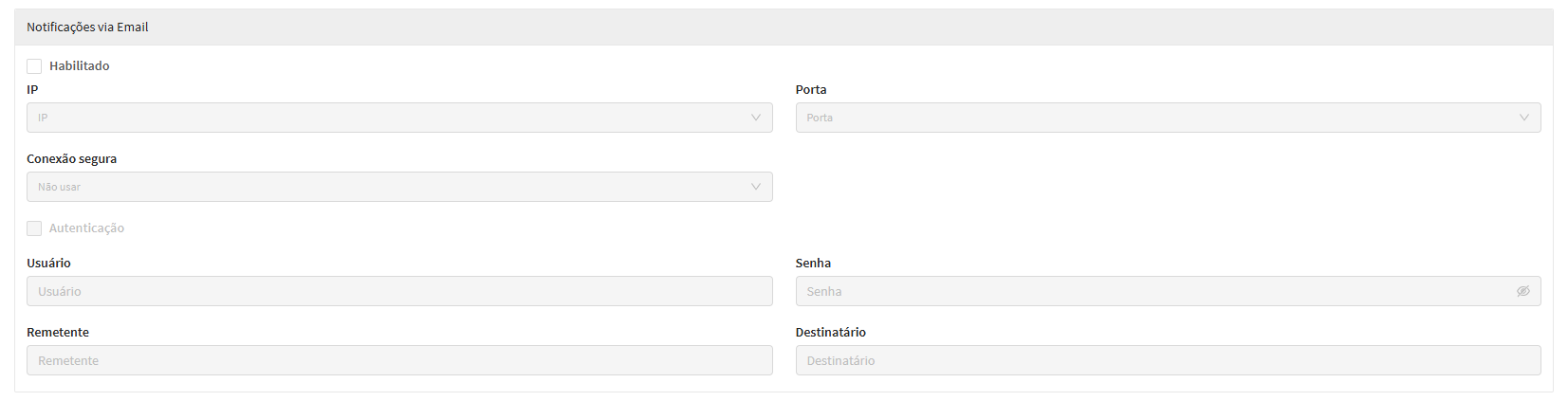
IP: Insira o IP do servidor de e-mail.
Port: Informe a porta SMTP do servidor, por exemplo, 587.
Secure connection: Escolha o tipo de criptografia, como SSL ou TLS.
Authentication: Se necessário, marque esta opção e insira as credenciais de autenticação.
User: Insira o usuário de autenticação, por exemplo, admin@webmail.com.
Password: Digite a senha correspondente.
From email: Insira um e-mail válido que será o remetente das notificações, por exemplo, notifications@webmail.com.
Recipient: Informe o e-mail do suporte que deve receber as notificações, por exemplo, suporte@webmail.com.
Salvar Configurações:
After inserting all the details, save the settings.
With these steps, NGFW will be configured to send notifications to the Webmail support email.
For more detailed information, please access our official documentation at: https://docs.blockbit.com/display/RC/Notifications+via+Email